Add Passenger Emails and FFNs in One Step When Using Convert to Longsell
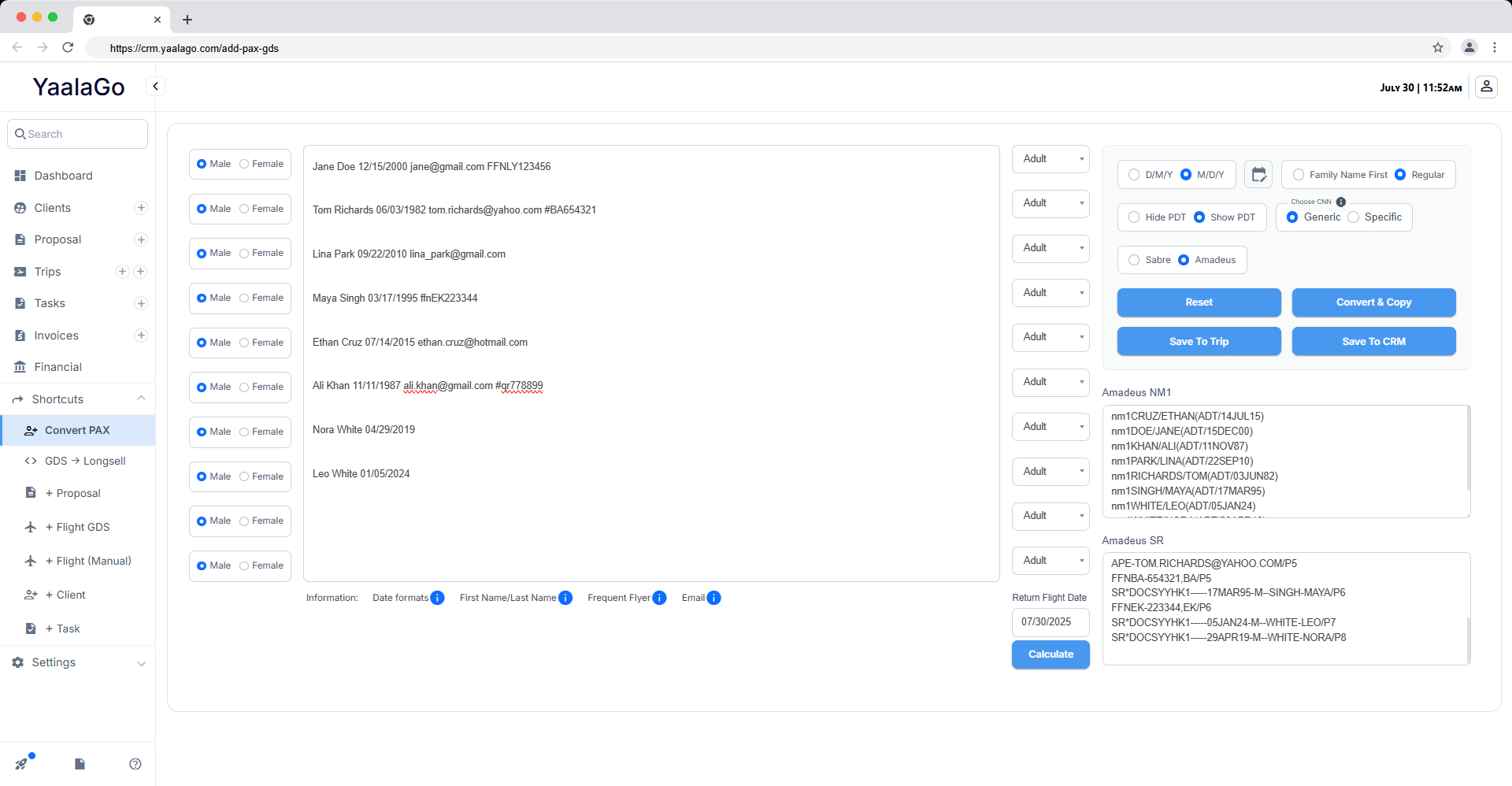
You can now include passenger email addresses and frequent flyer numbers (FFNs) directly in the Convert PAX input. This works for both Amadeus and Sabre.
Here's what’s supported:
1. Email Addresses
-
Add the passenger's email directly at the end of the line.
-
The system will automatically use the email for Passenger Email, 3CTCE, and SSR.
-
Example:
Jane Doe 12/15/2000 jane.doe@email.com
2. Frequent Flyer Numbers (FFN)
- Add the FFN in the same line, directly after the email or date of birth.
- Use one of the following accepted formats (case insensitive):
ffnLY1234567FFNLY1234567#LY1234567#ly1234567
- The airline code is automatically linked to the FFN.
- FFNs are stored in the client profile and used during conversion.
Important Notes:
- You don’t need to include DOB or email for this to work. The system will process what you provide.
- FFNs must be entered on the same line as the passenger. Multiple FFNs per passenger are not supported.
- YaalaGo now maps the correct airline to the FFN during Amadeus conversion, avoiding unrelated airlines.