Agency Email Now Auto-CC’d and Clearly Shown on Emails
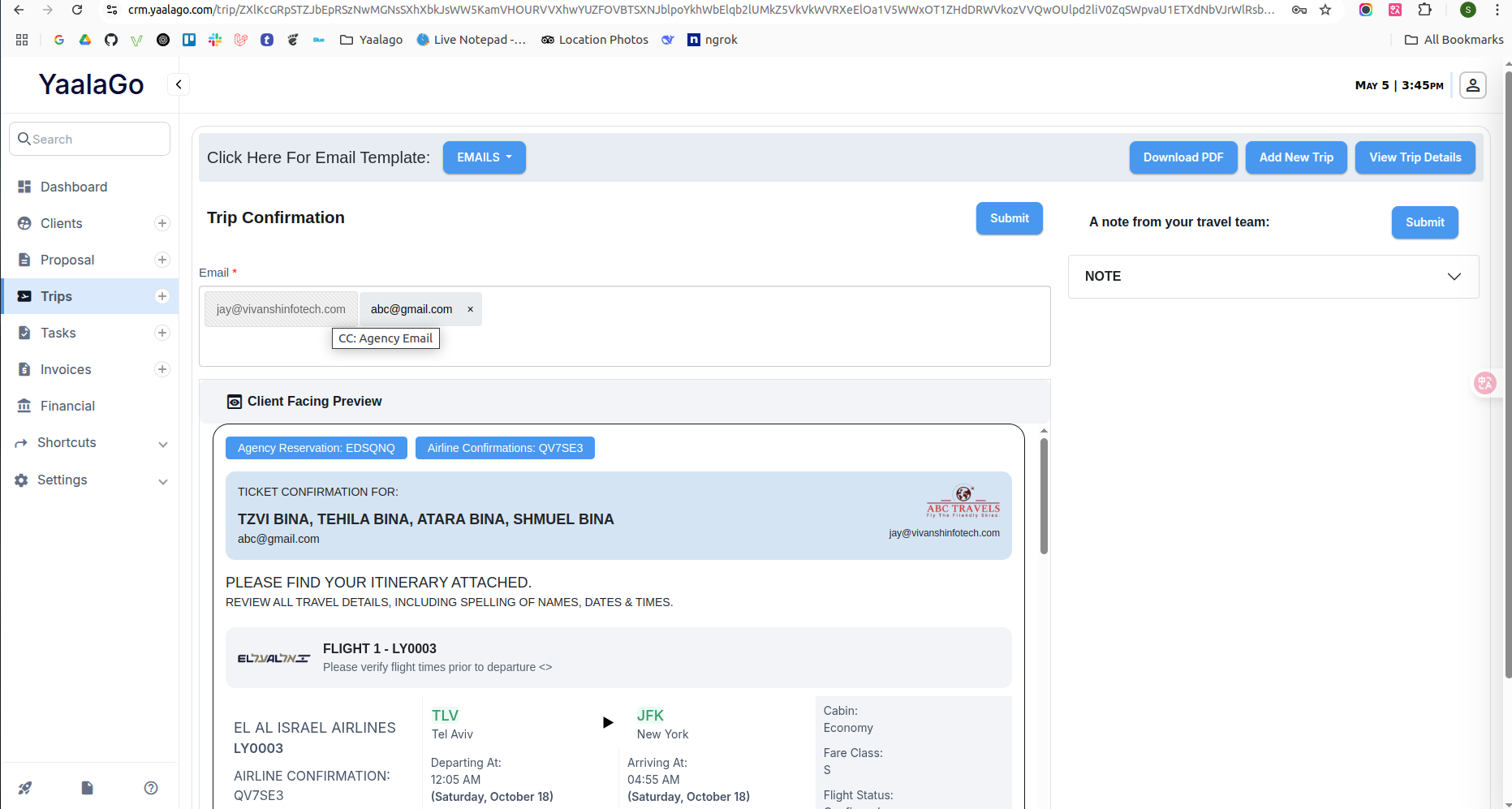
We’ve improved how agency emails are handled and displayed when sending key emails from YaalaGo. Agency contacts are now automatically CC’d on commission emails, trip confirmations, and invoice emails. You’ll clearly see where and when that’s happening within the system. This helps avoid confusion and ensures agencies stay in the loop.
What’s New:
- Commission Emails: When you send a commission notice from the Financials section, the agency email is automatically added as a CC. This email is now also visible on the page for reference.
- Trip Confirmations: Agency emails are now CC’d by default when sending trip confirmation emails from three key places:
- Email itinerary from the client link
- “Next” step after manual flight entry
- Edit Trip → Send → Email → Trip Confirmation
The agency email appears in grey with a slash icon to show that it’s fixed and can’t be removed.
- Invoice Emails: Agencies continue to be copied on all invoice emails automatically. This is not new, but it’s now part of our documented logic.
Additional Notes:
- You can update the agency email in Agency Settings. Only one email is supported at this time.
- A request to allow multiple agency emails and set specific emails for different types of notifications (e.g., invoices vs. trip confirmations) has been noted. This would be a larger change and is currently marked as low priority.