Assign Specific Segments to Each Passport During Longsell
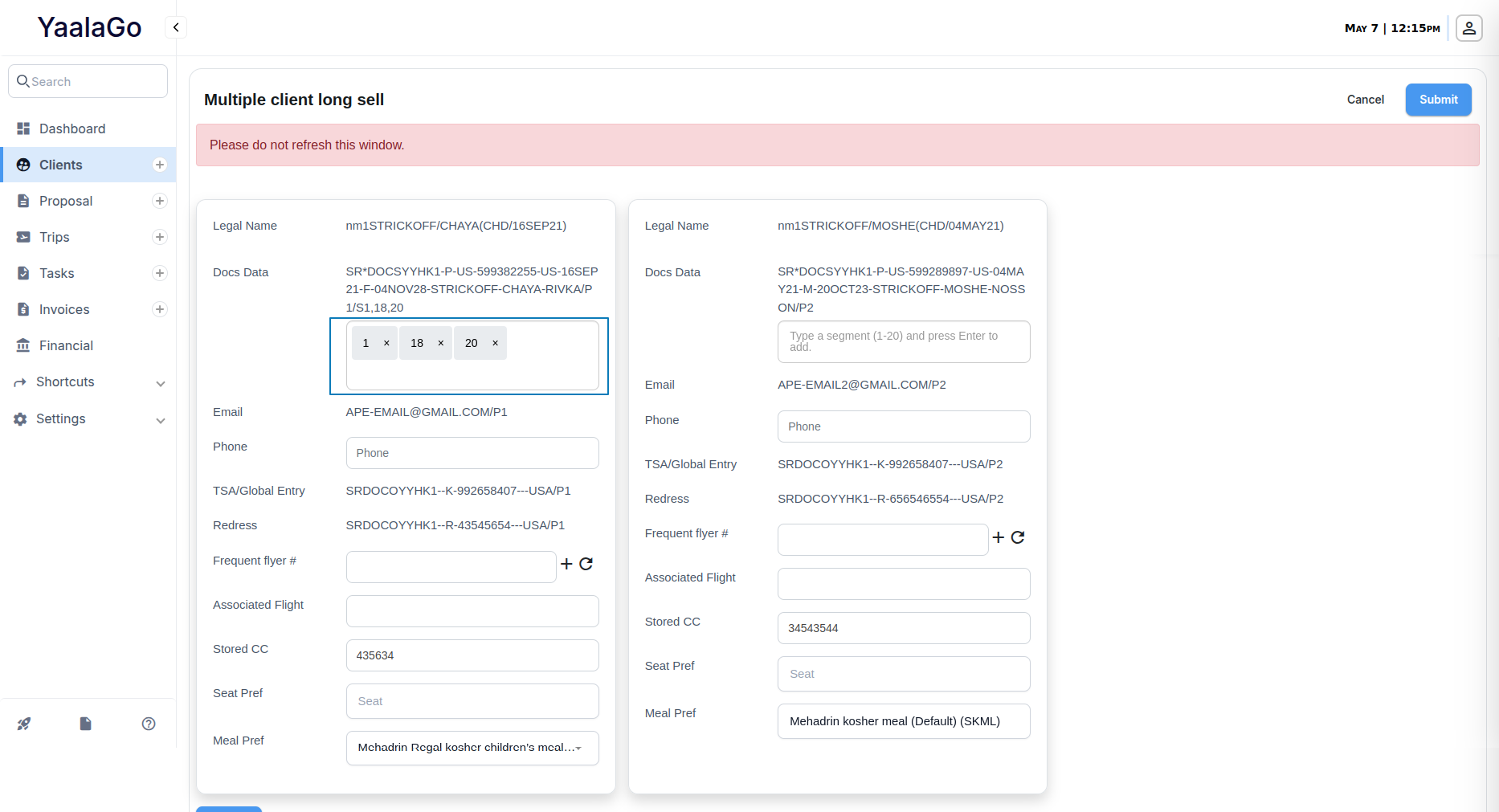
You can now assign specific flight segments to each passport when performing a longsell in YaalaGo. This helps ensure accurate documentation for travelers with multiple passports, especially in cases where different segments require different travel documents (e.g., one passport for outbound travel, another for return).
What’s New
- Segment Selection for Each Passport: When longselling from the client list or individual client record, you can now choose which segments a particular passport should apply to.
- Multi-Select Support: You can select one or more segment numbers using a simple tag field next to each passport entry.
- Sabre and Amadeus Compatibility: This update applies to both Sabre and Amadeus longsell formats.
- Cleaner Handling: If you don’t select any segment numbers, the system will continue with the default behavior (applying the passport to all segments).
- Validation Added: The input now only accepts numbers (1–20). The previous option to enter “A” for all segments has been removed. If the field is left blank, the system treats it as “apply to all segments.”
Where It Works
- Single and Multiple Longsell: Available from both individual client view and client list multi-select.
- Edit Client View: The segment selector is now part of the longsell popup for individual clients.
If you're using this feature, be sure to enter segment numbers carefully, especially when dealing with multiple passports. This gives you more control and ensures each document is used correctly across international routes.