Copy or Download Flight GDS Results as an Image
Copy or Download Flight GDS Results as an Image
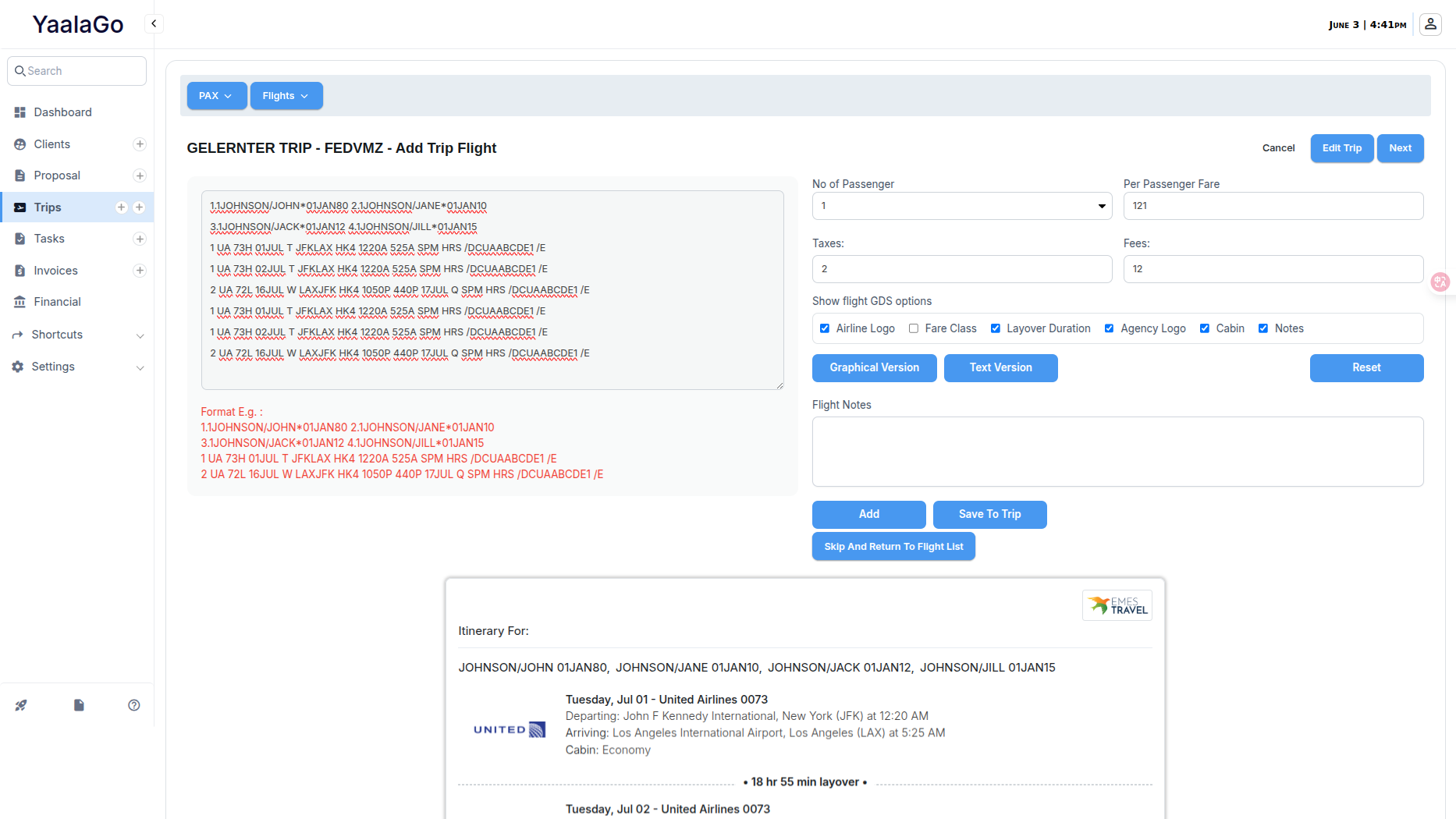
You can now copy or save Flight GDS results as an image directly from the Add Flight or Trip Flight GDS view. This new option makes it easy to export the information for use in itineraries, emails, or internal documentation.
Here’s what you can do:
- Copy to clipboard: Instantly capture the GDS results as an image and paste it where needed.
- Download as image: Save the output to your computer or device as a clean image file.
This feature works for both graphical and text-based layouts. On Safari, the copy function will open the image in a new tab, allowing you to right-click and copy it manually. This ensures compatibility across devices, even where direct clipboard permissions are limited.
Design has also been improved to ensure consistent formatting across most screen sizes and browser versions. If the output still appears misaligned or overly wide on your end, be sure to use full-screen mode or check display settings, as responsiveness can affect image rendering.
Note: This feature is still marked as Beta while we continue gathering user feedback and addressing edge cases. If you notice anything off, especially in Chrome, please share a screenshot so we can continue refining it.