Invoice Interface Improvements and Icon-Only Buttons
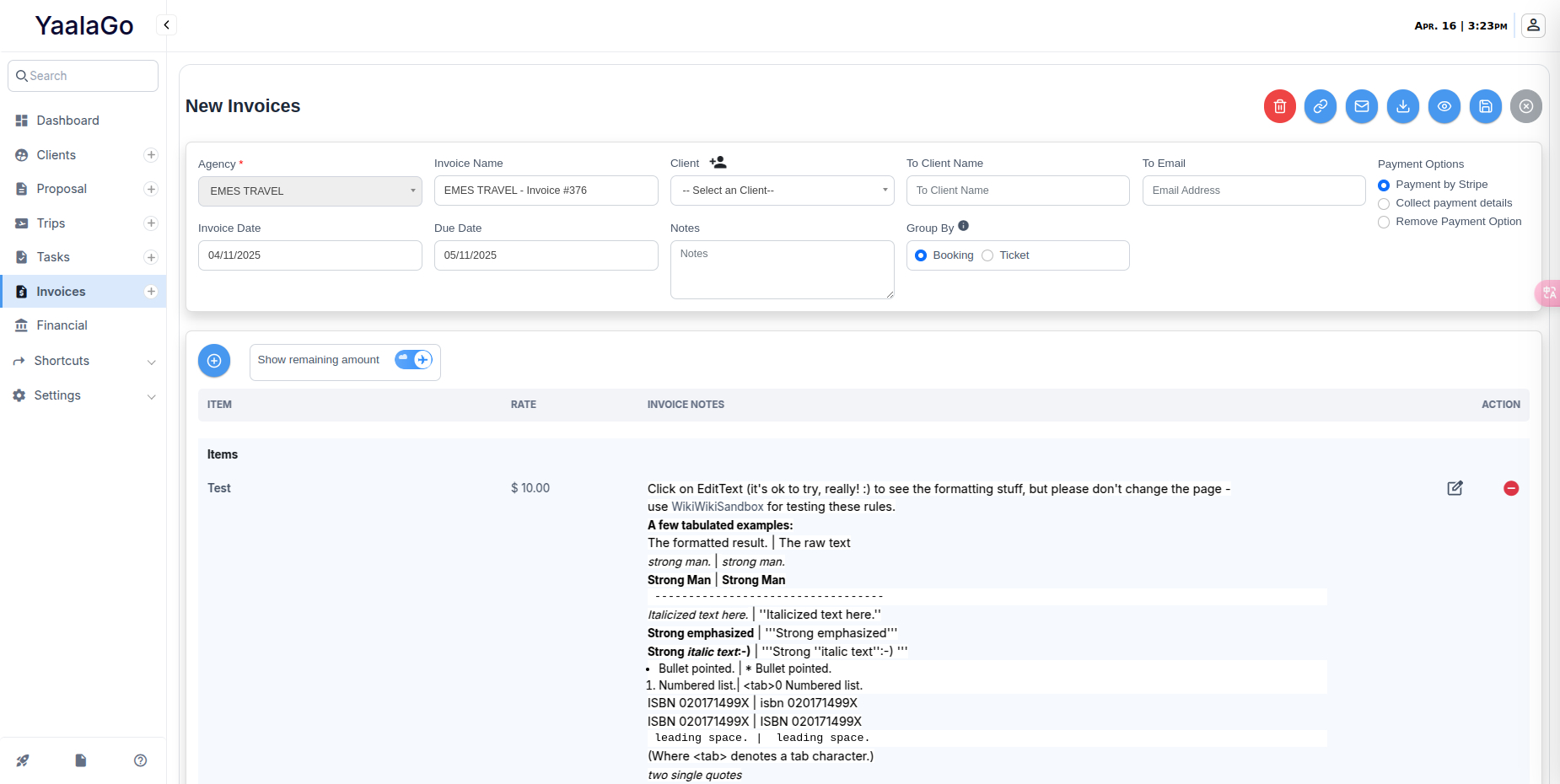
We’ve made a few updates to simplify and improve the invoice experience in YaalaGo CRM.
Text Changes:
- “Confirm only” has been updated to “Remove Payment Option” for better clarity.
- “Generate Invoice” is now labeled “Download PDF”.
- We've added a comma separator to amounts in the invoice email template to improve readability.
- The Personal Message field is now left-aligned by default.
Button Design Updates:
We've cleaned up the action bar on invoices by using icon-only buttons. On desktop, you’ll see the label when you hover over the icon. On mobile, the label appears when you tap or long press.
Here’s what each button now includes:
- Copy Invoice Link → Link icon (hover: “Copy Link”)
- Email Invoice → Envelope icon (hover: “Email”)
- Download PDF → Download icon (hover: “Download”)
- Preview → Eye icon (hover: “Preview”)
- Save & Continue → Checkmark or Save icon (hover: “Save”)
- Cancel → X or Stop icon (hover: “Cancel”)